POURing the Foundation of Accessibility: The Four Principles Behind WCAG
Prasaja Mukti - Accessibility UX Writer
●●
When you hear “web accessibility,” it can feel like a long list of technical checks likecontrast ratios, alt text, ARIA labels, captions, and more. But beneath the details, the Web Content Accessibility Guidelines (WCAG) rest on a simple framework: POUR.
-
Perceivable,
-
Operable,
-
Understandable,
-
Robust.
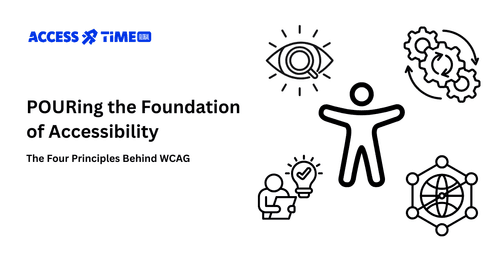
These four principles shape every success criterion in WCAG. They’re not abstract jargon. They’re the foundation for creating digital experiences that work for everyone.
Think of them as the four legs of a table. If one breaks, the whole thing collapses. A site that isn’t perceivable leaves blind users stranded. An app that isn’t operable frustrates people who can’t use a mouse. A form that isn’t understandable blocks users with cognitive differences. And if it isn’t robust, your product may fail when tomorrow’s assistive tech rolls out.
Why POUR Matters?
Accessibility is both a responsibility and a business driver. Global regulations (like the ADA in the U.S. and the European Accessibility Act (EAA)) lean heavily on WCAG. If your product doesn’t meet POUR, you risk lawsuits, lost contracts, and alienated customers.
Flip the perspective, though, and POUR-aligned products:
-
Reach a market of over 1 billion people with disabilities worldwide.
-
Improve usability for all users (who doesn’t appreciate clearer forms or consistent navigation?).
-
Strengthen brand reputation as inclusive, innovative, and legally compliant.
This is beyond checking boxes of what should be included. Opening doors to new markets, happier customer, and stronger business outcomes is the aspiration that worth the value.
The Four Principles at a Glance
Perceivable: Information must be presented in ways people can access. Example: alt text for images, captions for video, transcripts for audio.
Operable: Users must be able to operate all functionality. Example: full keyboard navigation, skip links, and accessible controls.
Understandable: Content should be predictable and easy to digest. Example: clear instructions in forms, consistent design for buttons and menus.
Robust: Content must be coded to work with assistive technologies, today and in the future. Example: semantic HTML and correct ARIA roles.
You can always ask about the product you build. "Is my product perceivable, operable, understandable, and robust?" And if any one is missing, accessibility gaps appear.
In our audits at AccessTime, we see teams relying on automated tools that give a “pass.” But real users still hit walls.
-
Infographics without alt text, leaving blind users excluded.
-
Hidden keyboard traps that freeze navigation.
-
Vague errors like “Invalid input,” giving no path forward.
-
ARIA roles misapplied, breaking screen reader support after a browser update.
Automated checks don’t capture these lived barriers because POUR gives you a clearer lens to see them.
You don’t need to be an accessibility engineer to begin. Start with these two options: Run a free audit with Access Lens (beta): Get a fast, actionable view of your POUR alignment. Spot missing alt text, focus issues, or structural inconsistencies.
Book an expert consultation with AccessTime. Our IAAP-certified consultants dig deeper into your flows, design system, and codebase, providing practical remediation guidance tailored to your product.
What’s Next?
This POUR introduction is just the start. In upcoming posts, we’ll explore each POUR principle in depth, complete with case studies and best practices:
-
Perceivable: Text alternatives and how to describe complex visuals.
-
Operable: Keyboard traps, focus states, and real-user navigation.
-
Understandable: Writing clear copy and designing predictable forms.
-
Robust: What clean, future-proof code looks like in practice.
Accessibility starts with POUR. Compliance, usability, and inclusivity all flow from these four principles. Try Access Lens (beta) today, or book a consultation with AccessTime to see how your product measures up.
Contact Us
Ready to explore how accessibility can transform your products? Visit our contact page to learn more about AccessTime consultancy services, or try Access Lens to get started with a fresh perspective on what's possible.
Share: